How Do You Send a Secret Nobody Else Can Read?
Files can pass through many systems before they reach the other person. Here's why protecting the contents matters — and how public and private keys help.
Your files pass through strangers
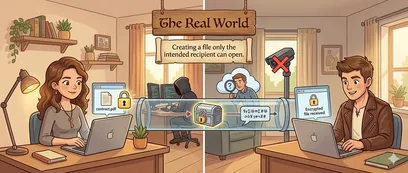
Part 1 — The problem
When you send a file over the internet, it may pass through Wi-Fi routers, internet service providers, cloud servers, and email relays. Transport encryption can protect files while they travel, but a provider handling readable copies or a compromised endpoint may still expose them. File encryption adds protection for the contents before you share them.
- Insecure networks
- Server breaches
- Surveillance
- Compromised devices
Now Imagine the Same Problem, Centuries Ago
To understand the solution, let's tell the story a different way — with padlocks, sealed letters, and a town full of curious couriers.
The old world version
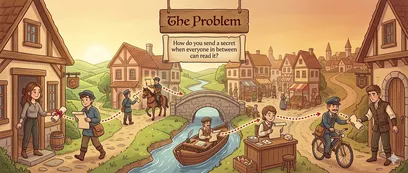
A secret that passes through five hands
Alice needs to send a confidential scroll to Bob. But the journey is long — it passes through a village messenger, a horseback courier, a river barge operator, a postal clerk, and a delivery boy. In this story, every person unfolds it and reads every word. By the time it reaches Bob, the secret is no longer a secret.
- Peeking
- Copying
- Tampering
The Padlock Solution
What if each recipient could share a lock, but keep the key secret? This is a simplified analogy for public-key encryption and optional signatures, not the exact mechanics of OpenPGP.
-
Step 1
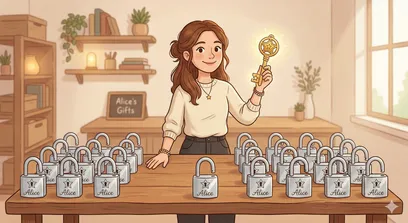
Everyone Makes a Padlock and a Key
Alice creates a golden key that she keeps secret, and many identical padlocks she can share with anyone. In this story, her golden key opens her padlocks. Think of the padlock as her public key and the golden key as her private key.
-
Step 2
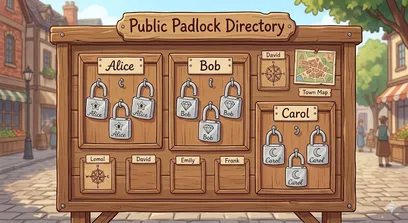
Padlocks Go on a Public Board
Alice hangs her padlocks on a public board in the town square. Bob, Carol, and others do the same. Anyone who wants to send someone a secret can grab their padlock from the board. This represents a directory of public keys, not private keys.
-
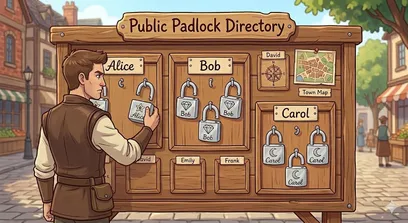
Step 3
Bob Grabs Alice's Padlock
Bob wants to send Alice a secret document. He visits the board and picks up one of Alice's padlocks. He checks its unique marking with Alice through a trusted channel. In CryptDrop, compare the public key's fingerprint independently; finding a key by email alone does not establish its owner's identity.
-
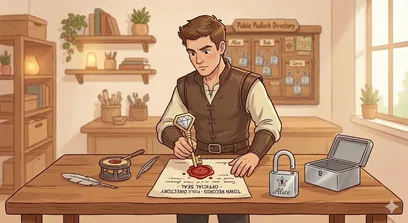
Step 4
Bob Stamps His Wax Seal
Before sealing the document, Bob chooses to add his own wax seal. This represents optionally signing with his private key. A signature lets Alice check whether it matches the chosen sender public key and whether the signed content has changed; it does not establish Bob's identity on its own.
-
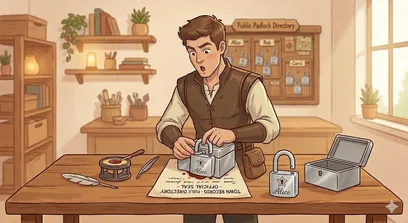
Step 5
Bob Locks the Box with Alice's Padlock
Bob places the document into a sturdy metal box and snaps Alice's padlock shut. In the story, he cannot reopen that box without her key. In CryptDrop, he encrypts for Alice's public key so that the matching private key can decrypt the result. Bob may still have his original file.
-

Step 6
The Locked Box Travels Across Town
A courier carries the locked box through busy streets, crowded markets, and past nosy neighbours. The lock protects the contents along the way. Likewise, Bob can send the encrypted file using his preferred channel, rather than relying only on that channel to protect the readable contents.
-
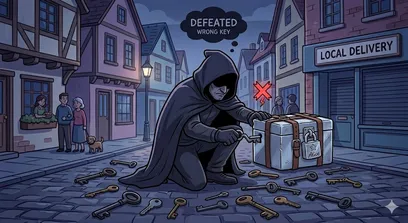
Step 7
A Thief Tries and Fails
A shadowy figure intercepts the box and tries every key they own. None fits Alice's padlock. The lesson is to keep the private key secret: encryption cannot protect a file from someone who gains access to the required key or to a readable copy on a compromised device.
-
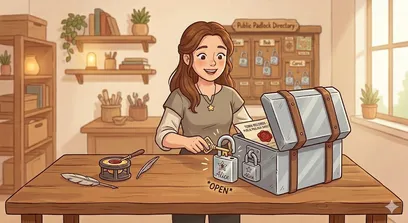
Step 8
Alice Opens the Box
The box arrives at Alice's workshop. She takes out her golden key and opens the lock. In CryptDrop, Alice uses her matching private key to decrypt the encrypted file in her browser. Opening the file is separate from checking a signature.
-
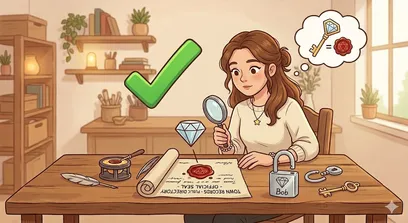
Step 9
Alice Checks Bob's Seal
If Bob signed the file, Alice can check its signature using his public key. A successful check means the signed content matches that key and has not changed since signing. To connect that key to Bob, she must independently check its fingerprint through a trusted channel. Unsigned files have no signature to check, and a signature check can fail.
From Padlocks to OpenPGP
The story explains the roles of keys and signatures. OpenPGP is a standard for encryption and digital signatures; CryptDrop uses the OpenPGP.js library to work with it in your browser.
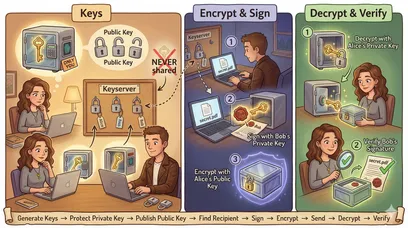
The real technology
Same idea. Digital keys.
Generate or import keys, find a recipient's public key, encrypt a file, and optionally sign it with your private key. The recipient decrypts with their private key and can check a signature with the sender's public key. Independently check key fingerprints through a trusted channel before relying on an identity.
File encryption and decryption run locally. Generating keys asks for your name and email and attempts to register your public key and identity. Public-key lookup and invitations also use network services; this is not an entirely offline workflow. Read about network services and protection limits.
Compare the story with the technology below. On narrow screens, scroll the table horizontally; keyboard users can focus it and use the arrow keys.
| In the story | In CryptDrop | What it does |
|---|---|---|
| Padlock | Public key | Shared so others can encrypt for you; check the fingerprint before trusting its identity |
| Golden key | Private key | Kept secret; the matching private key decrypts files encrypted for you |
| Wax seal | Digital signature | Optional; checked with the sender public key for signed-content integrity, not identity by itself |
| Locked box | Encrypted file (.pgp) | The encrypted output you download and share through your chosen channel |
| Public board | Public-key directory | CryptDrop registry, with keys.openpgp.org as a fallback for discovery |
| Town courier | The internet | The path used to send the encrypted file to the recipient |
Ready to Send Your First Secret?
Encrypt files in your browser, then share the encrypted result using your preferred channel.